Showing posts with label Ramdisk. Show all posts

Bypass iCloud Activation Lock iOS 10 Hardware Solution

Bypass iCloud Activation Lock iOS 10 Hardware Solution

Bypass iCloud Activation Lock iOS 10 Hardware Solution


What should I do if I suddenly forget my iCloud ID’s passcode? How can I remove my iPhone’s lost mode when my iCloud ID and passcode are stolen and changed by someone else? Where is the solution if i have lost my original purchase certificate and packaging box? Is it possible to unlock my iPhone through a software unlock method?  

HOW TO WORK ?

 How to Unlock Apple iPhone iCloud ID through Hardware Unlock Method?


 How to Unlock Apple iPhone iCloud ID through Hardware Unlock Method?

On the above photo, there are respectively 16GB hard disk/flash storage(serial number is stored here), baseband and chip from left to right. Baseband and chip are a whole set, and baseband must work with the IMEI which is stored in chip.

In general, what we need to replace are those three components, hard disk(flash memory), baseband and chip. However, some masters have cracked the data read/write of iPhone 5S’s chip; now we only need to replace baseband and hard disk, then use the particular IMEI box to write the IMEI into the chip.

Let’s see the locations of those three components.
 http://www.ioscyber.org/2017/02/bypass-icloud-activation-lock-ios-10.html


  1.  Use hot wind to disassemble the hard disk.

 How to Unlock Apple iPhone iCloud ID through Hardware Unlock Method?

2. Deal with the ponding pad of hard disk.

 How to Unlock Apple iPhone iCloud ID through Hardware Unlock Method?

3. Continue to dissemble the baseband.

 How to Unlock Apple iPhone iCloud ID through Hardware Unlock Method?

4. Deal with the ponding pad of baseband.


 How to Unlock Apple iPhone iCloud ID through Hardware Unlock Method?

5. Import the data of new chip into the original ID panel.


 How to Unlock Apple iPhone iCloud ID through Hardware Unlock Method?

6. Assemble the new hard disk and baseband, then use 3uTools or iTunes to flash this iPhone 5S.

 How to Unlock Apple iPhone iCloud ID through Hardware Unlock Method?

7. Now you can boot and activate it, and use it normally.
 How to Unlock Apple iPhone iCloud ID through Hardware Unlock Method?

How to Unlock Apple iPhone iCloud ID through Hardware Unlock Method?
Now the whole process of unlocking Apple iPhone 5S’s iCloud ID is complete. Currently 3uTools is an iOS jailbreak and flash tool, and the next big update will add many more features. To view 3uTools video tutorials, you may search 3uTools on Youtube.
If you have any questions about iOS and 3uTools, please post them on 3uTools Facebook group "3uTools for iOS Users".


Firmware Keys for iOs 9.3.4 iPhone 4S iPhone 5 Have Been Released

Firmware Keys for iOs 9.34 iPhone 4S iPhone 5 Have Been Released


This firmware keys will let you how to modify iOS 9.3.4 File System  IPSW in order to create a custom firmware (IPSW) and restore with LibiMobileDevice for iCloud Bypass on iPhone 4S iOS 9.3.4
It might work with your iphone  4s using libimobilerestore but custom firmware are very difficult to restore without iboot exploit.

I did try many custom ipsw or custom firmwares restore injection using libimobilerestore but i never managed to successfully 100% to bypass activation using CFW up to 7.1.2 iphone4. Custom Firmware will work 100% on iphone 4 and other older devices using firmware keys or bundles.


  • if you want be a developer you should try yours CFW and find new methods or new ways to finaly make CFW work for all.


How to build Custom Firmware For ios 9.3.4 Here


Bypass iCLoud Custom Firmware ios 9.3.4 By Cyber Junior


Bypass iCLoud Custom Firmware iOs 9.3.4

Unlock iCloud with Custom Ramdisk

Bypass iOS 9.3.4 and 9.3.5 iCloud And Built custom iphone firmware, As long as we know, asr doesn't verify a copy iOS ramdisk, so i have some trick how to built root ramdisk with asr verification. 

Now i Found some way how to Patch asr (Apple System Restore)

You have to decrypt ioOs firmware or ipsw file from terminal command

Run 
Sudo Unzip iPhone4,1_9.3.4_13G35_Restore.ipsw

http://www.ioscyber.org/2016/09/bypass-icloud-custom-firmware-ios934.html


Decrypt iOS Filesystem with Vfdecrypt, you can download tool HERE

Run Command

./vfdecrypt -i 058-48374-035.dmg -k 1c016b9999d81b0a624bb3f0a5b11a354bd0ff8666d7e5c26e4f7d117b978198bb4195c9 -o rootfs.dmg

http://www.ioscyber.org/2016/09/bypass-icloud-custom-firmware-ios934.html

Mount The root filesystem and delete Setup.app then Find the .Cpio File inside System directory and deleted it.

Then Build back Filesystem with DMG.Exec.. You can Download it HERE

Run Command
./dmg build


Unlock iCLoud New Hardware Methode iPhone 4s and 5S

New Unlock iCLoud  Hardware Methode iPhone 4S and 5S 

Bypass Locked iCloud With USB Flashdisk Methode


Anyone got your iphone Locked iCloud you can try this way. This is a new method found to bypass locked ilcoud, sometime Software, DNS, and Proxy methode not working for your iDevice, This methode is the easy way that you can do yourself, no internet needed and no software. and this methode can bypass all iphone and all ios locked icloud, you can bypass ios your iPhone 4/4S iPhone 5/5C/5S and iPhone 6, i will explain you step by step.

Okey, Now we will begin from the start through the finish.

First Step
You have to disassembly your idevice

http://www.ioscyber.org/2016/09/bypass-icloud-with-usb.html
iPhone 4s


 Step 2

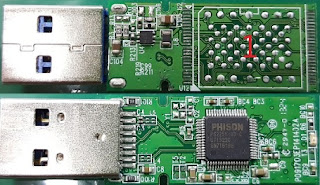
Prepare USB Flashdisk and disassembly it to move your nand memory of your idevice, now i will explain you which type USB Flashdisk you use for each iPhone.
http://www.ioscyber.org/2016/09/bypass-icloud-with-usb.html
USB Flashdisk

If You have iphone 4S. you have to find a USB Flashdisk with LGA52/BGA152 Pinboard or you can find to PCBA LGA52, Nand memory of iPhone 4S Made with by PCBA LGA52 type.

This Nand Memory IC THGVX1G8D4GLA08 is toshiba provider


http://www.ioscyber.org/2016/09/bypass-icloud-with-usb.html
NAND Memory iPhone 4s

http://www.ioscyber.org/2016/09/bypass-icloud-with-usb.html
USB Flasdisk With PCBA52

This USB Flashdisk is compatible for nand flash memory iPhone 4s

For iPhone 5/5C/5S, you have to find a USB Flashdisk with LGA60/BGA160 for iPhone 5/5C and  LGA62/BGA162 Pinboard or you can find to PCBA LGA60/62, Nand memory of iPhone 5/5C Made with by PCBA LGA60 type.

http://www.ioscyber.org/2016/09/bypass-icloud-with-usb.html
USB Flashdisk LGA62
   
http://www.ioscyber.org/2016/09/bypass-icloud-with-usb.html
NAND Memory iPhone 5S

After you got it just move your iphone to the usb flash and plug to your PC/MAC and Delete Setup.app.


New Unlock iCloud Hardware PART 1


New Unlock iCloud Hardware PART 2


Unlock Icloud Ipad 2 Hardware Methode

Bypass iPad 2 Hardware Methode

Unlock iCloud iPad 2 with Hardware Methode 


On Model A1396 (GSM) remove resistor R1205.
On Model A1397 (CDMA) remove resistor R1205 on the spot of R1204.

You will turn off the modem and change identity of your iPad.
Warning! Be careful. If you are unsure of your skills, entrust this work to professionals.

Schematic 1


http://www.ioscyber.org/unlock-icloud-ipad-2-hardware-methode.html

Schematic 2


http://www.ioscyber.org/unlock-icloud-ipad-2-hardware-methode.html

Schematic 3

http://www.ioscyber.org/unlock-icloud-ipad-2-hardware-methode.html


Ok, Tablet enter DFU mode.

Connect the tablet to your PC or Mac.

After that you need to restore the tablet through iTunes with firmware of Wi-Fi model and activate using the official method.

and Turn off the automatic firmware update: Setting\ iTunes Store, App Store\ Automatic download\Updates.

So, your ipad have Done bypass icloud,

After applying of it you will get ipad mini 3 only Wi-Fi and GPS will Work too.